To tell if a chat screenshot is fake, look for the message in the original conversation. Compare the exact wording, who sent it, and the messages around it. If you cannot access the thread, ask a participant privately what they can confirm. Fonts, timestamps, and image scans can help you decide what to check next.
What is the screenshot supposed to prove?
A screenshot showing “Yes, go ahead” could be presented as approval to publish, buy, or share something. Before judging the image, write down the specific claim. “Alex agreed to post the photos publicly on Thursday” gives you the account, the action, who would see the photos, and the date to check.
Keep the image as you received it, with the date, sender, and any link or caption that came with it. Zoom or mark up a copy. If you ask for help, share only the parts needed for the check and get permission before uploading someone else’s private conversation.
How do you check the original conversation?
If you are a participant, search the original chat for a distinctive phrase. Read the preceding and following messages and follow any quoted reply to the message it references. Check the account through the contact or profile you already know. A display name and profile photo can appear on different accounts.
If somebody else received the message, ask them through a contact method you already trust. A participant can show or describe the relevant messages without circulating the entire conversation. Some apps let participants enable disappearing messages. Signal, for example, describes how messages are removed when the timer expires. Signal’s guide to disappearing messages
If the histories differ, record which device or account showed each version and when it was checked.
How a real crop can change the meaning
In this fictional exchange, the shared screenshot shows only two lines:
Jamie: Can I share the photos today?
Alex: Yes, go ahead.
The thread continues:
Alex: In the family group only, please.
Jamie: Got it.
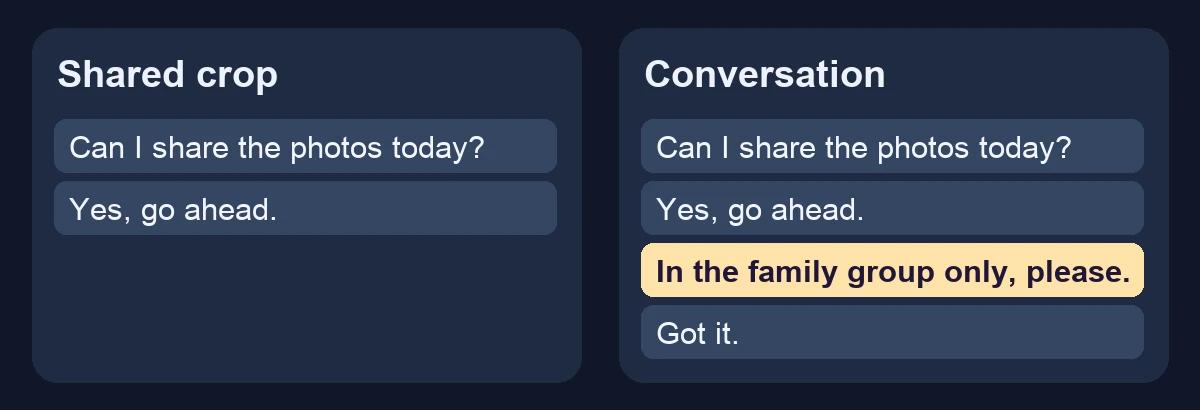
The words in the screenshot match the thread. The omitted messages show that Alex gave permission to share only in the family group. I would record the crop as missing context and save the two additional messages alongside it.
What can explain a difference between two copies?
| What you notice | What to check |
|---|---|
| The display name looks right, but the sender is unfamiliar | Open the account from the original thread and compare it with a contact you already know. |
| The bubble spacing, text size, or timestamp looks odd | Compare the same app and platform, with the same font size, display settings, and time zone where possible. |
| A message differs between the screenshot and the app | Check for an edit history or deletion indicator if the app exposes one. Ask when the screenshot was taken. |
| The image starts or ends at a convenient line | Ask to see the preceding and following messages. Check what a reply was quoting. |
For example, Apple’s Messages can display an “Edited” marker. Tapping it on a supported device can show earlier versions of a message. A screenshot taken before the edit can therefore differ from the current conversation. Apple’s guide to edited and unsent messages
What can an image scan tell you about a chat?
A chat screenshot is an image of whatever was displayed or assembled. It could be an authentic capture of an in-app thread, a crop that omits context, or a picture with a changed line. The source conversation is the strongest check available to most readers.
If a screenshot contains a separate picture you suspect was generated with AI, try to get the attached image itself. An image detector can inspect the file you provide for supported visual and provenance signals. The text, sender identity, and whether anyone sent the message require separate confirmation. Cropping and re-encoding can also change what a detector finds. AIFakeScan image detector · Screenshot and compression experiment
Write a conclusion that reflects the evidence you obtained. “The screenshot shows the words in the original thread, but leaves out who could see the photos” is more precise than calling the whole image fake. If you have no original thread or independent confirmation, “I could not verify this screenshot” is an accurate outcome.
Chat screenshot FAQ
Can an AI detector tell if a DM was actually sent?
A detector can analyze an image file. To verify whether a DM was sent, find it in the originating app or confirm the details with a participant through an established contact channel.
Is a missing message proof the screenshot was edited?
A missing message leaves several possibilities open, including deletion, an unsent message, a different thread, or alteration of the image. Compare the available histories and note what each participant can confirm.
What if the chat screenshot is from Instagram?
Ask to see the original DM or the original public post, depending on what the screenshot claims to show. If the question is how the picture in an Instagram post was made, follow the steps in the Instagram photo verification guide.